
The process of manual accounts payable may seem easy and manageable from the outside, when SMBs are dealing with only a small number of vendors and invoices. But as the businesses grow, the payment volume starts to increase, the approvals start to pile up, and crucial vendor details start getting scattered across the spreadsheets, emails, and accounting tools. This process can quickly become too difficult to control.
In fact, what makes this even more challenging is its hidden cost. Industry benchmarks vary but manual invoice processing can often cost anywhere between $12 to $30 per invoice and can often take more than a week to complete. Furthermore, when finance teams are stuck in chasing approvals, re-entering information, and correcting incomplete vendor records, the accounts payable process can turn into a source of delays, errors, and extra manual work.
This is why Accounts Payable automation software for small businesses can bring a streamlined structure to vendor payments by organizing records, simplifying approvals, improving visibility, and keeping accounting data better aligned. This results in a more efficient AP process with less manual effort, less friction and fewer gaps to correct later. Continue reading this article to know more about how accounts payable automation works for small businesses.
Why Manual AP Becomes Hard for Small Businesses
The manual accounts payable process may seem simple from the outside at first, but it can often become too difficult to manage as the businesses grow. More vendors, more invoices, and more approvals can rapidly turn this entire process into a scattered one. Payment details may get stored in emails, Excel spreadsheets, bank portals, and accounting systems, making it difficult for teams to track the status of what’s approved, pending, and what still needs more attention. Without a structured and streamlined workflow, manual AP can lead to delays, duplicate work, reconciliation issues, and weaker visibility into the upcoming cashflow requires.
This is where the importance of accounts payable automation software for small businesses becomes more apparent.
| Manual AP Issue | What the Issue can lead to |
|---|---|
| Crucial vendor information is scattered | Constant follow-ups and slower approval process |
| Missing/Incorrect Details or Manual Checks | Delays in the payment process and extra manual cleanup work |
| Separate record updates | Duplicate work and reconciliation gaps |
Often, these issues can become more visible during the process of a payment run or month-end close. Small business accounts payable automation can help in reducing this friction by improving visibility, control, and workflow consistency.
What an AP Automation Software Does for Small Businesses
An automated accounts payable software helps small businesses manage what happens before, during and after vendor payments in a more structured way, without depending on scattered tools or manual tracking. So, instead of juggling between emails, spreadsheets, and accounting systems, an automated Accounts Payable system can bring everything into one connected workflow. This not only improves visibility but also reduces errors and saves time across the entire AP process. Furthermore, it provides teams with better clarity on what needs to be a priority at each stage, so they’re not constantly chasing updates or dealing with back and forth follow ups.
For SMBs, useful AP automation workflow usually support:
- Vendor onboarding (collecting crucial details accurately at the time of onboarding)
- Payments-ready vendor records (reduces delays usually created by missing information)
- Approval workflows (ensuring trackable approval process)
- ACH and check payments (supporting different vendor preferences)
- Payments batches for weekly or recurring runs (saving time on execution)
- Payment status tracking (reduces vendor follow-ups and manual reviews)
- Sync with the accounting software (keeping vendor records in sync)
- Tax and compliance record continuity wherever relevant (helps simplify the year-end processes)
When it comes to SMBs, they often prefer clarity over complexity. Automated AP software connects vendor management, payments, accounting, and compliance in one streamlined workflow, reducing manual effort while improving control and accuracy.
How AP Automation Software Works – Simple Workflow
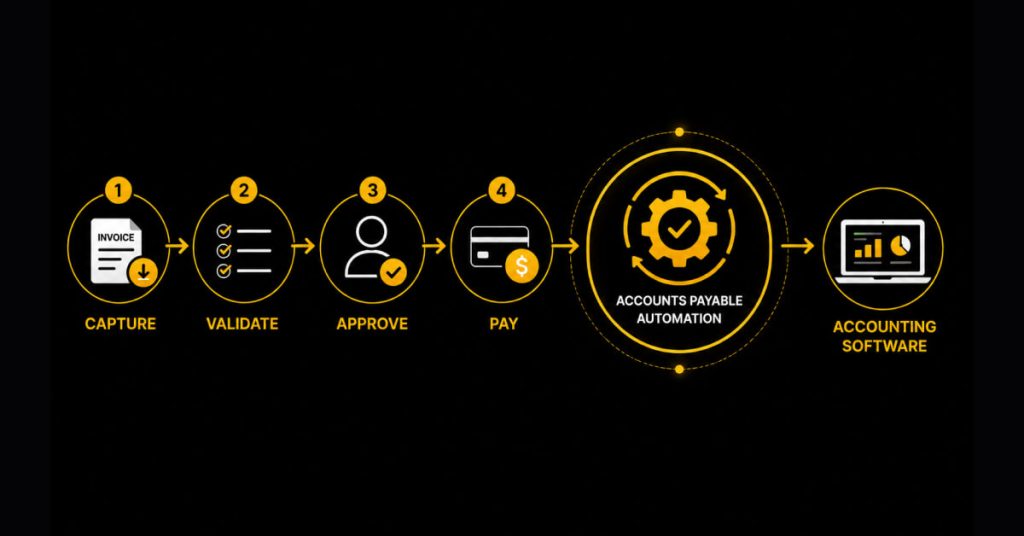
An automated AP software usually follows a simple, clear, end-to-end workflow that can help small businesses manage their vendor payments without missing important details. A usual AP automation workflow usually looks like this –
| STEP | WHAT HAPPENS |
|---|---|
| Vendor Onboarding | Vendor details are collected and verified |
| Payment Reviews | Invoice and payment requirements are reviewed |
| Approval | Payments follow an organized and structured approval workflow |
| Payment | Payments can be sent via vendor’s preferred method, like ACH or check |
| Sync and Compliance | Data is synced and prepared for reporting with accounting systems, like QuickBooks |
This structured workflow allows small businesses to have better visibility into each stage of the accounts payable process, including –
- Which vendors are payment-ready?
- Which payments still require review or approval
- Which payments are scheduled, processing, paid, failed, or returned
- Which records have successfully synced with QuickBooks
- Which vendor tax details may support 1099 reporting later?
This clear visibility is very important because most of the AP problems usually start from a lack of context. For example, an invoice may be submitted, but payment details could still be incomplete. An invoice may get approved, but payment maynot havebeen sent yet. Or a payment may be completed while accounting records lag. AP automation connects all these steps and bridges the gap, reducing the need for constant follow-ups and last-minute corrections.
Speed approvals, cut errors and close faster with Zenwork Payments.
AP Automation Helps in Reducing These Gaps
1. Incomplete Vendor Information
One of the most common issues most AP teams realize later is the incomplete or incorrect vendor information, like missing vendors bank information, addresses, or tax forms.
With Automation – Vendor information is collected and verified at the time of onboarding, so the payments are not delayed later because of back and forth follow ups.
2. Payments Getting Stuck Mid-Process
In the manual AP process invoices often move ahead without a complete clarity reviewed but not approved, approved but not scheduled, or scheduled but not tracked.
With Automation – Each and every payment moves through a simple and clearly defined flow, so nothing gets stuck between stages or lost in communication.
3. Consistent Vendor Follow-Ups and Status Confusion
Finance team often spend most of their time in answering questions like “Has this been approved?” or “When will this be paid?”
With Automation – Payment status is visible in one place, reducing the need for manual tracking and repeated follow ups.
4. Duplicate Information Across the System
Updating the same vendor or payment information across spreadsheets and accounting software can create unnecessary information repetition and increases the risk of errors.
With Automation – The information stays in sync across the systems with automated AP and reduces duplication and keeps the records up to date.
5. Failed Payments and Reworks
Outdated or wrong payment details can lead to failed transactions and often forces the AP teams to start the payment process again from the scratch manually.
With Automation – With the automated AP, errors are easier to catch early, and failed payments can be corrected and reprocessed without disrupting the workflow.
6. Disconnected Compliance Records
Tax information and payment records are often managed separately, making the year-end reporting more time consuming.
With Automation – Vendor, payment, and tax information stay connected, making compliance tasks like 1099 preparation easier.
What Small Businesses Should Prepare Before Automating AP
Small and medium-sized businesses often do not need to redesign each finance process before using an automated AP solution. They should start by preparing the records and decisions that make automation useful.
| Readiness Area | What to Prepare |
|---|---|
| Vendor records | Active vendors, contacts, payment details, and tax forms wherever needed |
| Payment Information | ACH/Check preferences and required payment details |
| Accounting set-up | QuickBooks-synced categories and coding fields where needed |
| Approval Ownership | Tracking of who reviews and approves payments |
| Payment Run Process | Weekly, recurring, or scheduled payment timings |
| Exception Process | How failed, returned, or incomplete payments are handled |
| Compliance Records | W-9s, TIN details, and 1099-related information wherever applicable |
How Small Businesses Can Automate AP Without Overcomplicating It
Small businesses should automate AP in phases, starting with vendor onboarding. Cleaner records reduce payment delays and tax record gaps. Then make vendor records payment-ready by collecting payment details and tax documents where applicable.
Next, connect QuickBooks or the accounting system. This reduces duplicate updates and helps in keeping financial records aligned.
Post this, set up approval workflows. These should reflect how the business already reviews and authorizes payments.
Then organize weekly, recurring, or scheduled payment runs. Track payment status in one place. Create a clean process for failed, returned, or incomplete payments.
For businesses with 1099 requirements, keep W-9s, TIN, payment, and 1099-related records connected throughout the year.
This phased approach helps small teams in improving AP without adding unnecessary process weight.
How Zenwork Payments Supports AP Automation for Small Businesses
With Zenwork Payments, businesses can manage vendor onboarding, AP workflows, vendor payments, QuickBooks sync, and compliance records in a singleconnected process.
| AP Needs of SMBs | How Zenwork Payments Helps |
|---|---|
| Clean Vendor Set-up | Supports vendor onboarding and vendor self-service through the xForce vendor portal |
| Payment-ready records | Helps in collecting vendor details, payment information, and W-9 information before payment |
| Compliance | Connects vendor onboarding, W-9 collection, real-time TIN matching, and 1099 workflows |
| Structured Approvals | Supports approval workflows before payment move forward |
| Flexible payment execution | Supports ACH, FastPay ACH, and Check Payments |
| Easier Payment Runs | Helps in organizing payments into batches or recurring runs |
| Payment visibility | Supports payment tracking and payment status visibility |
| QuickBooks alignment | Supports QuickBooks sync wherever applicable |
Zenwork Payments is built for growing SMBs that want to reduce manual vendor payment work without adding unnecessary issues/complexity. It also helps finance teams organize vendor onboarding, maintain payment-ready records, route approvals, execute ACH, FastPay ACH or check payments, track status, and keep data in QuickBooks updated.
SMBs that need vendor tax information, Zenwork Payments also connects W-9 collection, TIN matching, and 1099 workflows. This helps in supporting clean vendor records before year-end filing review.
Real Life Scenarios
New Vendor Set-Up
An Accounts Payable Manager at a digital services company located in the United States may handle several new freelance vendors on a regular basis. In one instance where there was a requirement to make a payment to one of the vendors urgently, the manager realized that banking and tax information about the vendor was not complete. Rather than processing the payment, he made sure that the team obtained all the necessary information from the vendor, including W-9 information. After ensuring that the vendor was fully verified, the payment was successfully processed without any problems.
Failed Payment Follow-Up
An AP lead may have a case where one of the ACH payments failed due to outdated banking information of the vendor. Rather than making a manual entry for the payment, team checks the status of the payment within the system, updates the vendor’s details, and processes the payment again smoothly. The workflow can help ensure that there is no problem with the audit trails.
FAQs
1. How can I automate AP processes in my SMB?
An automated AP software can streamline the payable processes through vendor management, approval process, payments, status tracking, and synchronization with accounting systems.
2. Which AP processes should be automated for SMBs and growing businesses?
For small businesses and growing organizations, vendor management, payment ready records, approvals, payments tracking, QuickBooks sync, and exceptions are some of the tasks that need automation.
3. Does AP automation replace QuickBooks?
No. QuickBooks is an accounting system. An automated AP system syncs with QuickBooks for managing AP processes and keeping vendors’ invoice and payment information up to date.
4. Why is vendor management important in AP automation?
Vendor management is crucial in avoiding delays, lack of tax information, additional follow-ups, and problems with account reconciliation.
5. How can Zenwork Payments facilitate SMB AP automation?
Zenwork Payments offers services such as vendor management, approvals, payments using different payment methods, tracking, QuickBooks synchronization, and other tasks including W-9, TIN match, and 1099 workflows.
Ready to Reduce Manual AP Work and Gain Full Control Over Your Payments?