

When choosing a payment solution, most businesses focus on speed, cost, and ease of use, but simply ignore one of the most crucial aspect “compliances”. Day by day IRS thresholds are getting stringent, and the reporting requirements are getting more and more complicated, it’s no longer enough to just pay your vendors. Now you need to ensure that your every payment, especially to a vendor and supplier, is audit ready and is compliant from the start. This is where you need the AP Automation software, although many softwares now treat compliance as a late addition. So, continue reading this blog to know about the best AP automation software and what makes it a payment solution compliance ready. As well as why 1099 reporting matters now more than ever. So, if your current AP Automation software does not provide you with 100% compliance now, maybe it’s time to rethink.
What is a 1099?
A 1099 is a type of form used to report various types of incomes that are not salaries, wages or tips. Generally, it’s used for independent contractors, freelancers or suppliers who got paid more than $600 in a tax year. It’s a crucial form to report the income that’s not from traditional employment. 1099 also reports rental income, royalties, prizes and other miscellaneous incomes. (1099-MISC) Both the parties IRS and recipient get the copy which helps IRS to identify income and prevent tax evasion.
What is 1099-NEC Form?
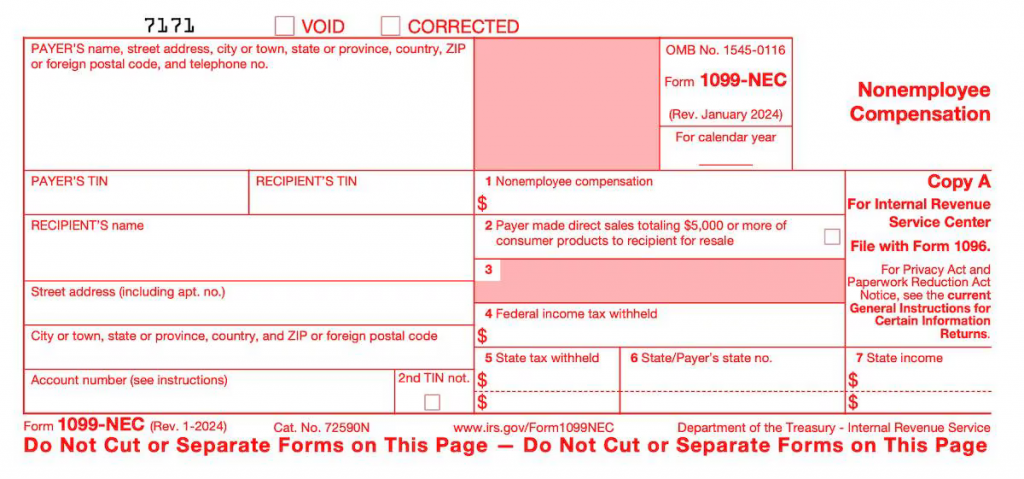
Form 1099-NEC stands for non-employee compensation. It is used by businesses to report payments made to people who are not employed at the organization, yet they provide services like
- Freelancers,
- Individual contractors
- Gig workers.
1099- NEC is a crucial form to avoid penalties and accurate income reporting. All these payments should be more than $600 in a calendar year and should be conducted with ACH, Wire, or direct deposit. But if you have paid them with credit card then as per IRS you do not need to file for the 1099-NEC.
1099 Reporting with AP Automation
Now that we know how important the 1099-NEC forms and how important is and it’s reporting are, let’s understand what 1099 reporting is and how you can make your 1099 reporting easy as possible with AP Automation.
So, 1099 reporting is simply the process of verifying the process of which your vendors / suppliers require a 1099 filing this with the IRS and the supplier. AP automation drastically simplifies this process. With AP Automation software you only need to create a list of vendors and suppliers whom you paid more than $600 or more in the year, you can find this data easily using filters and reports (Excluding credit cards data.) As per IRS guidelines, any business filing more than 10 forms are now required to efile (electronic filing) IRS authorized platforms like Tax1099 help you file these efficiently and seamlessly.
How AP Automation Helps During Tax Season
AP automation is not only helpful in reporting 1099’s but also AP Automation is of a great help to the AP team in the tax season as well with removing / reducing the manual processes, streamlining the processes and improving accuracy.
Manual Process vs AP Automation
With Manual processes your AP team always end up spending more time of basic repeatable tasks like matching PO and manual data entry, on the other hand with AP Automation you can replace this error-prone process with almost near accurate system. And your AP team can shift their focus on more important strategic plans ahead.
Streamlined Reconciliation
One of the biggest advantages of using an AP Automated system rather than a manual process is the clear visibility. With AP Automation you get the real time clear visibility and the timely reporting of the supplier / vendor payments. All this makes for easier to reconcile accounts during tax seasons.
Audit
AP Automation makes for an easy audit with digital audit trail of payments, providing easy access to records in the need of audit.
Time savings
Did you know that the average time of processing an invoice manually is about 15.6 days for companies handling 2,000 to 5,000 invoices per month. Now compare this to automated process which takes about 2 to 4 days, saving you more than50% to 70% of time. AP automation reduces time by using OCR and streamlining the workflows.
Simplify 1099 Reporting with Zenwork Payments
Zenwork Payments simplifies 1099 reporting by automating the entire process from payment to filing. As each vendor payment is made with ACH or check, the system instantly drafts a 1099-NEC or MISC, stores the vendor’s W-9, and performs real-time TIN matching. This eliminates year-end data scrambles, prevents costly IRS penalties, and reduces manual entry. For $19.99/month, users can e-file forms, ensure compliance, and provide vendors with a self-service portal to track payments and forms, saving hours of back-and-forth communication.
FAQs
1) Why should I sync payments with compliance?
So every vendor payment is 1099-ready and audit-safe from day one.
2) How does AP automation help with 1099s?
AP Automation tracks who crosses $600 and sends eFiles without year-end cleanup.
3) What does Zenwork Payments do differently?
Zenwork Payments auto-drafts 1099s, runs real-time TIN and KYB checks, and stores W-9s for you.
Conclusion
With Zenwork Payments, every vendor onboarding starts with automated TIN matching and KYB verification. As soon as a vendor submits their W-9, Zenwork validates the Taxpayer Identification Number (TIN) in real time against IRS records, flagging mismatches before a payment is ever sent. This prevents B-Notices and eliminates year-end clean-up. On the KYB side, Zenwork runs OFAC screening, business name verification, and EIN cross-checks to ensure each payee is a legitimate entity, not a shell or blocked party. These checks happen instantly and are logged for audit-readiness, all embedded within your approval and payment workflow.
Remember the Best time to Automate Your AP was Yesterday; Second Best is Today!